


E-sim
 Jul 25th 2022 | 4:18 am
#1
Thread Starter
Just Joined
Joined: Sep 2020
Posts: 19


 E-sim
E-sim
E-sims:
I don’t want to remove my US SIM card, I want to use an Esim and use my US number for cell only, and then use the Esim for UK data, is it possible to do this?
Appreciate anyone who’s got experience with this?
yes my phone is unlocked and I could just disconnect from US life for a few weeks but that’s not reasonable.
Thanks.
I don’t want to remove my US SIM card, I want to use an Esim and use my US number for cell only, and then use the Esim for UK data, is it possible to do this?
Appreciate anyone who’s got experience with this?
yes my phone is unlocked and I could just disconnect from US life for a few weeks but that’s not reasonable.
Thanks.
Jul 25th 2022 | 4:22 am
#2
DE-UK-NZ-IE-US... the TYP

Joined: Mar 2010
Posts: 3,018
Re: E-sim
E-sims:
I don’t want to remove my US SIM card, I want to use an Esim and use my US number for cell only, and then use the Esim for UK data, is it possible to do this?
Appreciate anyone who’s got experience with this?
yes my phone is unlocked and I could just disconnect from US life for a few weeks but that’s not reasonable.
Thanks.
I don’t want to remove my US SIM card, I want to use an Esim and use my US number for cell only, and then use the Esim for UK data, is it possible to do this?
Appreciate anyone who’s got experience with this?
yes my phone is unlocked and I could just disconnect from US life for a few weeks but that’s not reasonable.
Thanks.
Should be doable with a dual sim iPhone. You can select which SIM to use for data. You can also select 1 data line or allow switching. You can set default voice line so you us the local one.
Jul 25th 2022 | 4:26 am
#3
Thread Starter
Just Joined
Joined: Sep 2020
Posts: 19
Re: E-sim
Thank you. Ive read some folks having trouble with their attempts. I have the 12 pro max. It is capable just haven’t tried yet.
Jul 26th 2022 | 7:22 pm
#5
Thread Starter
Just Joined
Joined: Sep 2020
Posts: 19
Re: E-sim
So it looks like every E-sim I've looked at only allows Data and not cell, I'm assuming I can still make calls over the internet with just data but I've never tried so I may be going in blind on this one.
Jul 27th 2022 | 10:25 am
#6
DE-UK-NZ-IE-US... the TYP
Joined: Mar 2010
Posts: 3,018
Re: E-sim
You can make calls like what’s app or FaceTime over data, but WiFi calling won’t work unless your on WiFi (not LTE) so you can’t avoid roaming charges like that…
Jul 27th 2022 | 11:18 am
#7
Thread Starter
Just Joined
Joined: Sep 2020
Posts: 19
Re: E-sim
The real emphasis is on not paying $10 a day to verizon for two weeks times three phones.
Jul 27th 2022 | 11:23 am
#8
BE Enthusiast
Joined: Feb 2015
Posts: 574
From: New Jersey, USA
Re: E-sim
Actually you can if you have an iPhone...
You just have to either disable international roaming with AT&T/Verizon or use manual network selection to force your phone onto a network that they don't have a roaming agreement with. Your phone will then use data from the other SIM for "WiFi" calling and you can make/receive calls for free while abroad.
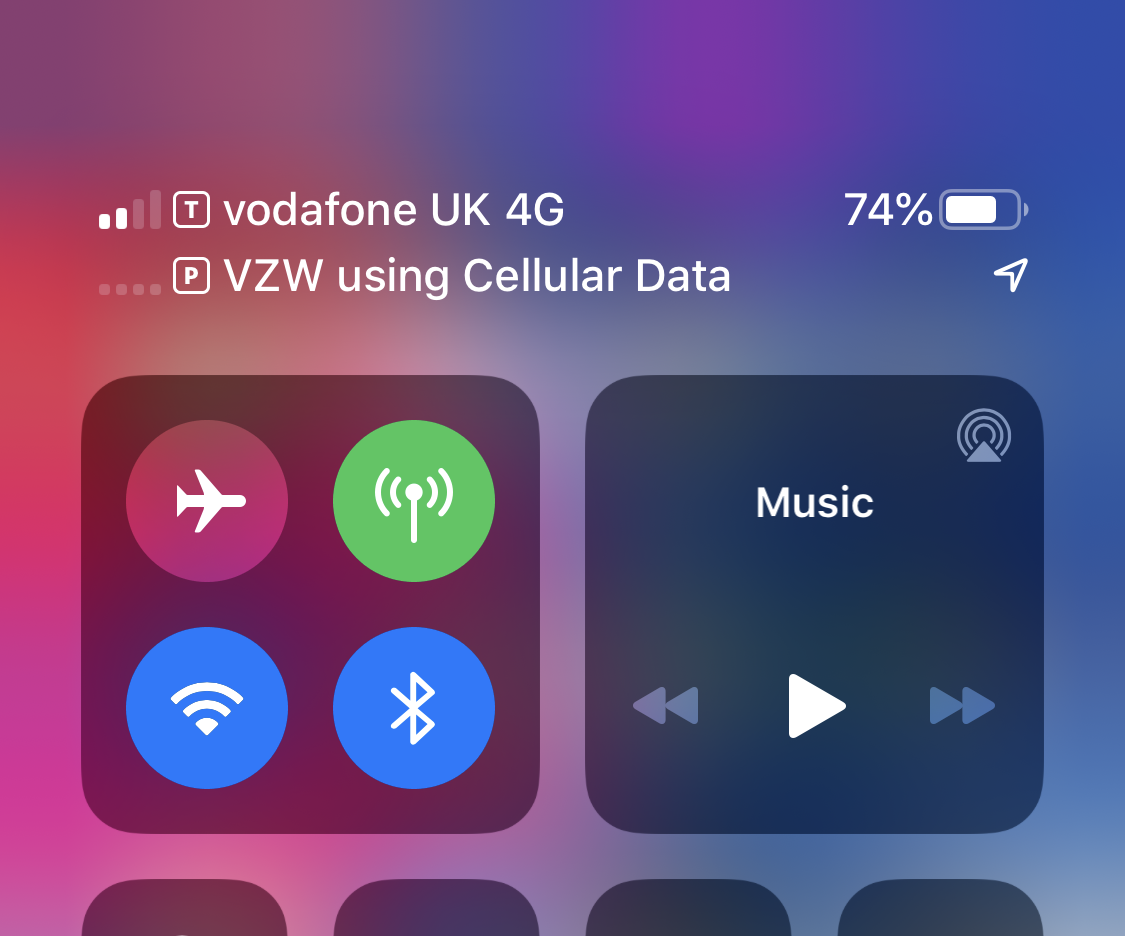
You just have to either disable international roaming with AT&T/Verizon or use manual network selection to force your phone onto a network that they don't have a roaming agreement with. Your phone will then use data from the other SIM for "WiFi" calling and you can make/receive calls for free while abroad.
Jul 27th 2022 | 12:17 pm
#9
Thread Starter
Just Joined
Joined: Sep 2020
Posts: 19
Re: E-sim
Actually you can if you have an iPhone...
You just have to either disable international roaming with AT&T/Verizon or use manual network selection to force your phone onto a network that they don't have a roaming agreement with. Your phone will then use data from the other SIM for "WiFi" calling and you can make/receive calls for free while abroad.
You just have to either disable international roaming with AT&T/Verizon or use manual network selection to force your phone onto a network that they don't have a roaming agreement with. Your phone will then use data from the other SIM for "WiFi" calling and you can make/receive calls for free while abroad.
 Jul 27th 2022 | 3:43 pm
#10
DE-UK-NZ-IE-US... the TYP
Joined: Mar 2010
Posts: 3,018
Re: E-sim
Actually you can if you have an iPhone...
You just have to either disable international roaming with AT&T/Verizon or use manual network selection to force your phone onto a network that they don't have a roaming agreement with. Your phone will then use data from the other SIM for "WiFi" calling and you can make/receive calls for free while abroad.
You just have to either disable international roaming with AT&T/Verizon or use manual network selection to force your phone onto a network that they don't have a roaming agreement with. Your phone will then use data from the other SIM for "WiFi" calling and you can make/receive calls for free while abroad.
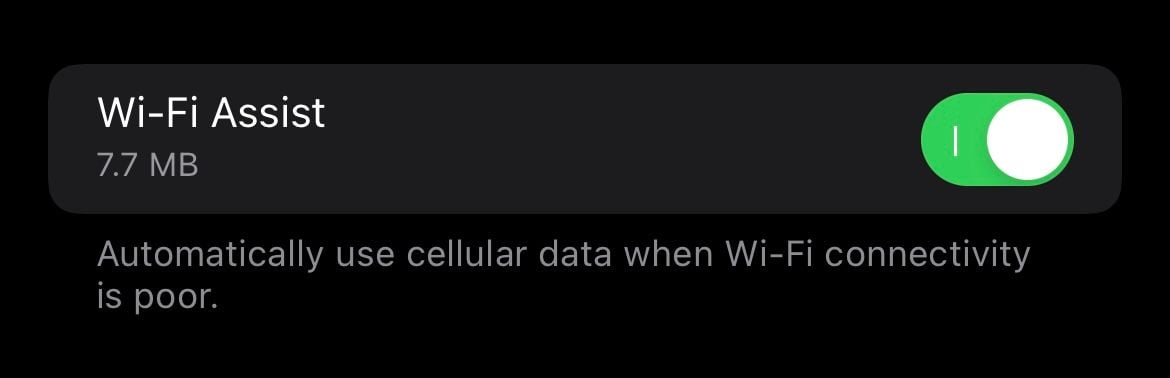
If this works it’s a much cleaner solution than the one I used for India before I had a dual sim phone. I had a Glocalme WiFi hotspot I would carry with me and then have the phone connect to that when away from office/hotel and turn off roaming and WiFi calling on.
Jul 28th 2022 | 1:10 am
#11
BE Enthusiast
Joined: Feb 2015
Posts: 574
From: New Jersey, USA
Re: E-sim
I do but that setting doesn't control WiFi calling.
As long as the US SIM has no cell service it'll fail over to WiFi calling via the other (local) SIM - I've used it on multiple trips abroad now and it works perfectly. It was a new feature added in iOS 13 I think...
As long as the US SIM has no cell service it'll fail over to WiFi calling via the other (local) SIM - I've used it on multiple trips abroad now and it works perfectly. It was a new feature added in iOS 13 I think...
Jul 28th 2022 | 5:19 am
#12

You aint seen me, right?
Joined: Oct 2005
Posts: 3,573
From: US of A, TN
Re: E-sim
I was under the impression you'd just get a sim in the UK and convert it to an e-sim. When I got my phone last month they upgraded the wrong line and it was e-sim only so it had the wrong number. I put my old sim into it, it was instantly recognised. I then deleted the e-sim and converted my physical sim to an e-sim for good measure.
Jul 28th 2022 | 5:47 am
#13
Thread Starter
Just Joined
Joined: Sep 2020
Posts: 19
Re: E-sim
I was under the impression you'd just get a sim in the UK and convert it to an e-sim. When I got my phone last month they upgraded the wrong line and it was e-sim only so it had the wrong number. I put my old sim into it, it was instantly recognised. I then deleted the e-sim and converted my physical sim to an e-sim for good measure.

