Go Back  British Expats > Living & Moving Abroad > Canada > The Maple Leaf
Reload this Page >

To type the £ sign:-

Wikiposts

To type the £ sign:-

Thread Tools
 
Old Feb 16th 2010 | 9:35 am
  #1  
Thread Starter
Banned
 
Joined: Feb 2010
Posts: 50
boo meringue is just really niceboo meringue is just really niceboo meringue is just really niceboo meringue is just really niceboo meringue is just really niceboo meringue is just really niceboo meringue is just really niceboo meringue is just really niceboo meringue is just really niceboo meringue is just really niceboo meringue is just really nice
Default To type the £ sign:-

for all of you who write pounds/sterling there is a really quick way, all you have to do is press the key "alt" with left index finger while pressing "1 5 6" on the NUMERIC keyboard with your right index finger et voila, merci beaucoups
 
Old Feb 16th 2010 | 9:45 am
  #2  
Binned by Muderators
 
Joined: Jul 2007
Posts: 11,708
From: White Rock BC
JonboyE has a reputation beyond reputeJonboyE has a reputation beyond reputeJonboyE has a reputation beyond reputeJonboyE has a reputation beyond reputeJonboyE has a reputation beyond reputeJonboyE has a reputation beyond reputeJonboyE has a reputation beyond reputeJonboyE has a reputation beyond reputeJonboyE has a reputation beyond reputeJonboyE has a reputation beyond reputeJonboyE has a reputation beyond repute
Default Re: To type the £ sign:-

Or in Word 2007

insert/symbol/£
 
Old Feb 16th 2010 | 10:07 am
  #3  
Account Closed
 
Joined: Jul 2007
Posts: 26,319
DaveLovesDee has a reputation beyond reputeDaveLovesDee has a reputation beyond reputeDaveLovesDee has a reputation beyond reputeDaveLovesDee has a reputation beyond reputeDaveLovesDee has a reputation beyond reputeDaveLovesDee has a reputation beyond reputeDaveLovesDee has a reputation beyond reputeDaveLovesDee has a reputation beyond reputeDaveLovesDee has a reputation beyond reputeDaveLovesDee has a reputation beyond reputeDaveLovesDee has a reputation beyond repute
Default Re: To type the £ sign:-

Originally Posted by boo meringue
for all of you who write pounds/sterling there is a really quick way, all you have to do is press the key "alt" with left index finger while pressing "1 5 6" on the NUMERIC keyboard with your right index finger et voila, merci beaucoups
Or Alt+0163.
 
Old Feb 16th 2010 | 10:26 am
  #4  
mandymoochops's Avatar
Sawdust making harpy
 
Joined: Sep 2007
Posts: 11,291
From: Alberta
mandymoochops has a reputation beyond reputemandymoochops has a reputation beyond reputemandymoochops has a reputation beyond reputemandymoochops has a reputation beyond reputemandymoochops has a reputation beyond reputemandymoochops has a reputation beyond reputemandymoochops has a reputation beyond reputemandymoochops has a reputation beyond reputemandymoochops has a reputation beyond reputemandymoochops has a reputation beyond reputemandymoochops has a reputation beyond repute
Default Re: To type the £ sign:-

Originally Posted by CaptainHook
Or Alt+0163.
Any ideas how to do it on a laptop
 
Old Feb 16th 2010 | 10:29 am
  #5  
Oink's Avatar
.
 
Joined: Sep 2008
Posts: 20,188
Oink has a reputation beyond reputeOink has a reputation beyond reputeOink has a reputation beyond reputeOink has a reputation beyond reputeOink has a reputation beyond reputeOink has a reputation beyond reputeOink has a reputation beyond reputeOink has a reputation beyond reputeOink has a reputation beyond reputeOink has a reputation beyond reputeOink has a reputation beyond repute
Default Re: To type the £ sign:-

Originally Posted by mandymoochops
Any ideas how to do it on a laptop
I can’t imagine that’s recommended.
 
Old Feb 16th 2010 | 10:33 am
  #6  
 
Joined: Jul 2005
Posts: 15,883
Steve_P is an unknown quantity at this point
Default Re: To type the £ sign:-

Originally Posted by mandymoochops
Any ideas how to do it on a laptop
Start Button/Programs/Accessories/System Tools/Character Map.

Seventh row down third from left - click on it, then click "Select" and then Click "Copy".

Now paste into document.

A bit convoluted but it gets you your £ sign.
 
Old Feb 16th 2010 | 10:33 am
  #7  
Banned
 
Joined: Oct 2008
Posts: 3,824
From: the GTA
Auld Yin has a reputation beyond reputeAuld Yin has a reputation beyond reputeAuld Yin has a reputation beyond reputeAuld Yin has a reputation beyond reputeAuld Yin has a reputation beyond reputeAuld Yin has a reputation beyond reputeAuld Yin has a reputation beyond reputeAuld Yin has a reputation beyond reputeAuld Yin has a reputation beyond reputeAuld Yin has a reputation beyond reputeAuld Yin has a reputation beyond repute
Default Re: To type the £ sign:-

Originally Posted by mandymoochops
Any ideas how to do it on a laptop
There are probably keystrokes for it but I'm challenged, so use the Character Map. Click on the Start ball and type in Character Map and it will magically appear. Copy it then paste it on your email/whatever.
 
Old Feb 16th 2010 | 10:38 am
  #8  
mandymoochops's Avatar
Sawdust making harpy
 
Joined: Sep 2007
Posts: 11,291
From: Alberta
mandymoochops has a reputation beyond reputemandymoochops has a reputation beyond reputemandymoochops has a reputation beyond reputemandymoochops has a reputation beyond reputemandymoochops has a reputation beyond reputemandymoochops has a reputation beyond reputemandymoochops has a reputation beyond reputemandymoochops has a reputation beyond reputemandymoochops has a reputation beyond reputemandymoochops has a reputation beyond reputemandymoochops has a reputation beyond repute
Default Re: To type the £ sign:-

Originally Posted by Steve_P
Start Button/Programs/Accessories/System Tools/Character Map.

Seventh row down third from left - click on it, then click "Select" and then Click "Copy".

Now paste into document.

A bit convoluted but it gets you your £ sign.
Cheers guys I knew about that one (though choose not to use it as it would be quicker and easier to hike through the Andes) just wondered if there were as AY said any smart keys.
 
Old Feb 16th 2010 | 10:43 am
  #9  
Thread Starter
Banned
 
Joined: Feb 2010
Posts: 50
boo meringue is just really niceboo meringue is just really niceboo meringue is just really niceboo meringue is just really niceboo meringue is just really niceboo meringue is just really niceboo meringue is just really niceboo meringue is just really niceboo meringue is just really niceboo meringue is just really niceboo meringue is just really nice
Default Re: To type the £ sign:-

Originally Posted by mandymoochops
Any ideas how to do it on a laptop
same , except if the laptop has a Fn (function) key, use that to turn your Num Lock on.
 
Old Feb 16th 2010 | 10:57 am
  #10  
mandymoochops's Avatar
Sawdust making harpy
 
Joined: Sep 2007
Posts: 11,291
From: Alberta
mandymoochops has a reputation beyond reputemandymoochops has a reputation beyond reputemandymoochops has a reputation beyond reputemandymoochops has a reputation beyond reputemandymoochops has a reputation beyond reputemandymoochops has a reputation beyond reputemandymoochops has a reputation beyond reputemandymoochops has a reputation beyond reputemandymoochops has a reputation beyond reputemandymoochops has a reputation beyond reputemandymoochops has a reputation beyond repute
Default Re: To type the £ sign:-

Originally Posted by boo meringue
same , except if the laptop has a Fn (function) key, use that to turn your Num Lock on.
maybe i'm just being a little dense but theres no num lock key, certainly not on this laptop as it doesn't have a number pad to lock..

I think i'll just type gbp its quicker!!!
 
Old Feb 16th 2010 | 11:03 am
  #11  
 
Joined: Jul 2005
Posts: 15,883
Steve_P is an unknown quantity at this point
Default Re: To type the £ sign:-

Originally Posted by mandymoochops
maybe i'm just being a little dense but theres no num lock key, certainly not on this laptop as it doesn't have a number pad to lock..

I think i'll just type gbp its quicker!!!
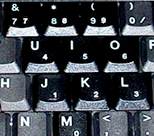
Do any of your keys look like those in the picture?

 
Old Feb 16th 2010 | 11:04 am
  #12  
mandymoochops's Avatar
Sawdust making harpy
 
Joined: Sep 2007
Posts: 11,291
From: Alberta
mandymoochops has a reputation beyond reputemandymoochops has a reputation beyond reputemandymoochops has a reputation beyond reputemandymoochops has a reputation beyond reputemandymoochops has a reputation beyond reputemandymoochops has a reputation beyond reputemandymoochops has a reputation beyond reputemandymoochops has a reputation beyond reputemandymoochops has a reputation beyond reputemandymoochops has a reputation beyond reputemandymoochops has a reputation beyond repute
Default Re: To type the £ sign:-

Originally Posted by Steve_P
Do any of your keys look like those in the picture?

http://fsymbols.com/img/laptop.jpg
nope

ooooh hang on a cotton picking minute ....................... yes apologies they do, but seriously don't worry it's not like I type the pound sign much nowadays!

Last edited by mandymoochops; Feb 16th 2010 at 11:06 am.
 
Old Feb 16th 2010 | 11:05 am
  #13  
 
Joined: Jul 2005
Posts: 15,883
Steve_P is an unknown quantity at this point
Default Re: To type the £ sign:-

Originally Posted by mandymoochops
nope
Then I think you are SOL.
 
Old Feb 16th 2010 | 11:35 am
  #14  
BE Forum Addict
 
Joined: Jan 2008
Posts: 1,236
Elizabeth I is a glorious beacon of lightElizabeth I is a glorious beacon of lightElizabeth I is a glorious beacon of lightElizabeth I is a glorious beacon of lightElizabeth I is a glorious beacon of lightElizabeth I is a glorious beacon of lightElizabeth I is a glorious beacon of lightElizabeth I is a glorious beacon of lightElizabeth I is a glorious beacon of lightElizabeth I is a glorious beacon of lightElizabeth I is a glorious beacon of light
Default Re: To type the £ sign:-

it didn't work
 
Old Feb 16th 2010 | 11:37 am
  #15  
BE Forum Addict
 
Joined: Jan 2008
Posts: 1,236
Elizabeth I is a glorious beacon of lightElizabeth I is a glorious beacon of lightElizabeth I is a glorious beacon of lightElizabeth I is a glorious beacon of lightElizabeth I is a glorious beacon of lightElizabeth I is a glorious beacon of lightElizabeth I is a glorious beacon of lightElizabeth I is a glorious beacon of lightElizabeth I is a glorious beacon of lightElizabeth I is a glorious beacon of lightElizabeth I is a glorious beacon of light
Default Re: To type the £ sign:-

$


Contact Us - Archive - Advertising - Cookie Policy - Privacy Statement - Terms of Service - Your Privacy Choices

Copyright © 2026 MH Sub I, LLC dba Internet Brands. All rights reserved. Use of this site indicates your consent to the Terms of Use.