


Italian keyboard
 Jun 5th 2021 | 6:07 pm
#16

Polished expat

Joined: Jul 2014
Posts: 18,683
From: Arcos de Valdevez "Onde Portugal se fez"


 Re: Italian keyboard
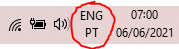
When my keyboard's working fine, it looks like this. Occasionally, it accidentally gets changed to ENG / UK and I get precisely the same symptoms you're describing. I just click on the icon and change it back to ENG / PT to correct.
Jun 5th 2021 | 7:56 pm
#17

Thread Starter
BE Forum Addict
Joined: Apr 2009
Posts: 2,675
From: Italy
Re: Italian keyboard
Thank you Red Eric- that's brilliant!
Jun 5th 2021 | 9:22 pm
#18
BE Forum Addict
Joined: Oct 2016
Posts: 1,309
From: Ex Teramo, Abruzzo
Re: Italian keyboard
It is as now anyone coming to this will know! Well done.. . Odd thing is (and I assume because of a default) my device (Windows 10) does NOT show that icon at all. I suspect it only appears if the default set-up is changed during installation or at a later date. On it changing accidently I would check it does not happen at times during the monthly update as I've noticed a few things being undone with them...
. Odd thing is (and I assume because of a default) my device (Windows 10) does NOT show that icon at all. I suspect it only appears if the default set-up is changed during installation or at a later date. On it changing accidently I would check it does not happen at times during the monthly update as I've noticed a few things being undone with them...
Jun 5th 2021 | 9:48 pm
#19
Polished expat
Joined: Jul 2014
Posts: 18,683
From: Arcos de Valdevez "Onde Portugal se fez"
Re: Italian keyboard
You're welcome - didn't want you having to type ALT 0063 until you got a new computer!
Re random changing of settings - mine's a shared laptop and it's probably easy enough to unwittingly drag the mouse pointer through the icon and change the setting or hit the Windows key and spacebar combo accidentally when looking for the comma or something. I mean, not the sort of thing I'd do, obviously, but it happens. I'l keep an eye out for whether updates clobber it, though - good thought.
Re random changing of settings - mine's a shared laptop and it's probably easy enough to unwittingly drag the mouse pointer through the icon and change the setting or hit the Windows key and spacebar combo accidentally when looking for the comma or something. I mean, not the sort of thing I'd do, obviously, but it happens. I'l keep an eye out for whether updates clobber it, though - good thought.

